IT106 Programme overview

Essentials
of AI

Applied AI for Entrepreneurship and Innovation

9 November to 9 December 2026

Humble

Delivered for

ISM University of Management and Economics

by

Mahdi Shariff

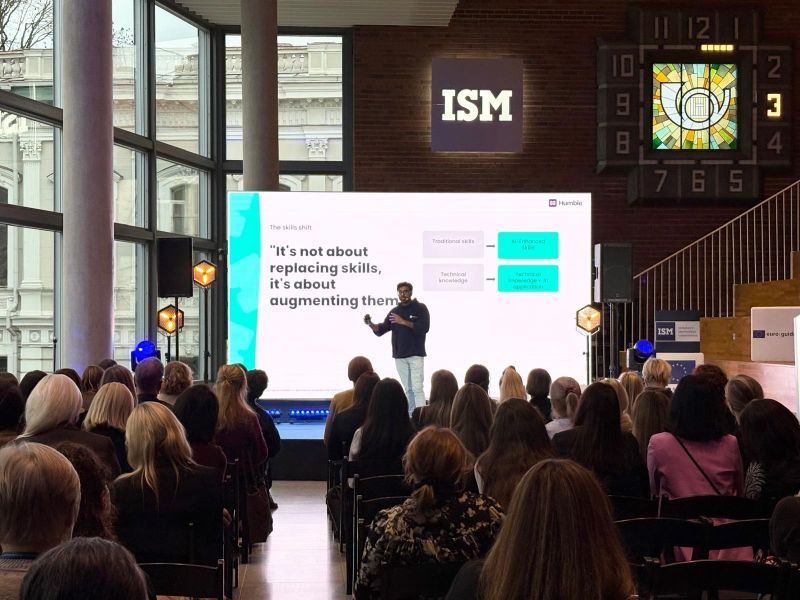
Mahdi teaching on stage at ISM

Welcome

Mahdi

Hello, I’m Mahdi

I’ll be your professor. My job is to help you use AI well in your studies, your career and your life.

Co-taught with Assoc. prof. dr. Eigirdas Žemaitis

Humble

This is Humble

Humble is my assistant to support your learning on this journey.

How it helps me

It will help me answer your questions.

Organise assignments.

Show you the progress you’ve made.

Humble AI ISM University of Management and Economics EY Ciklum
Forbes 30 Under 30 Google for Startups AI First Slush China

IT106 · Essentials of AI

The objectives of this course

ISM University of Management and Economics Humble wearing a graduation cap

ISM course objectives

1.

To be able to define Artificial intelligence and provide a typology of AI.

2.

To be able to understand AI technologies and its application for digital business development and societal development.

3.

To be able to understand the main AI principles and their working elements

4.

To be able to analyse societal and company problems and identify AI technologies to tackle them.

5.

To be able to understand ethical considerations, bias and the importance of regulation in the context of AI.

6.

To be able to develop critical thinking ability and problem-solving skills through experiential learning.

11 days

24 sessions

1 project

6 credits

The course

Themes we will talk about:

Ethics & morality

Privacy & security

Inclusivity

Economic & environmental impact of AI

Entrepreneurship in the AI era

Humans(!)

The lessons

What we’ll be covering:

01

Introduction to Generative AI

Mon 9 Nov · 08:40, 10:20

02

AI for you: making it work in your day

Tue 10 Nov · 08:40, 10:20

03

Getting the most out of your AI tools

Wed 11 Nov · 08:40, 10:20

04

How AI systems work

Wed 18 Nov · 14:20

05

AI at work and in teams

Wed 18 Nov · 16:20

06

Spotting AI opportunities

Fri 20 Nov · 08:40, 10:20

07

Practical business with AI

Mon 23 Nov · 08:40, 10:20

08

Ethical AI and what AI costs

Fri 27 Nov · 14:20, 16:20

09

Building with AI

Mon 30 Nov · 12:40, 14:20

10

Build and pitch prep

Fri 4 Dec · 08:40, 10:20, 12:40, 14:20

11

Final presentations

Tue 8 Dec · 08:40, 10:20

12

Reflection and final Q&A

Wed 9 Dec · 08:40, 10:20

How you are graded

You will be graded in two parts

60%

Group project

30%

Analysis and design

Frame a real problem and design your AI system

40%

AI system implementation

A working prototype, judged on creativity, feasibility and functionality

30%

Presentation and pitch

Your investor pitch, judged on its quality

40%

Individual participation

Class participation

Contributing in sessions, discussions and exercises

Ask questionsHelp each otherAll views are valid

Case study analysis

Your own analysis of real AI cases

Reflection paper

What you learned and what you would do differently

100% of your grade

60%

Group project

40%

Individual participation

+10%

Bonus: if you go above and beyond expectations

Ground rules

How we use AI in this course

  1. Use AI to learn, draft and build.
  2. Say when you used it and what for.
  3. You are responsible for every claim you submit, so check it.
  4. Keep your prompts and chats as a record of your work.
  5. Never paste in personal or confidential data.

ISM’s academic integrity rules still apply

Ways of working

How we will work together

1

Every session has three modes

I present, we discuss and you do. Bring a laptop or phone.

2

You work in teams

One group project all course. [Confirm: teams form on day 2.]

3

We use a real tool

You get access to Humble to work in as we go.

4

Ask early

Ask in class or email mahdi@humbleai.com. No question is too basic.

Section 2 of 5 · 08:50–09:15 (25 min)

Introductions and AI snapshot

By the end you will know who is in the room and where the class is with AI.

Introductions

Around the room, 30 seconds each

1. Who you are

Your name and what you study

2. How you use AI

One thing you did with AI in the last month

3. Your goal

One thing you want to be able to do by the end

4. Your question

One worry or question you have about AI

Task: write your name badge

AI snapshot

How do you feel about AI?

Positive. I am excited about what AI can do
Neutral. I am not sure yet, or I feel both
Negative. I am worried about what AI will do

Raise a hand for the one that fits best

Class results

  1. Positive0%
  2. Neutral0%
  3. Negative0%

Count the hands, then click a number to change it. Saved on this device.

AI snapshot

Where are you with AI today?

Not yet. I have not really used AI tools
Curious. I have tried a tool once or twice
Regular. I use a chat assistant most weeks for study or work
Confident. I upload files, write careful prompts and use projects
Builder. I have built an automation, app or assistant with AI

Raise a hand for the level that fits you best

Class results

  1. Not yet0%
  2. Curious0%
  3. Regular0%
  4. Confident0%
  5. Builder0%

Count the hands, then click a number to change it. Saved on this device.

AI snapshot

Which of these have you used?

Chat assistants ChatGPT, Gemini, Claude, Copilot
Research and search Perplexity, NotebookLM, Google AI Mode
Writing and design Grammarly, Notion AI, Canva
Image and video Midjourney, Sora, Veo
Building and coding Lovable, Bolt, Cursor, Claude Code
Inside your other tools Microsoft Copilot, Gemini in Google Workspace

Hands up for each row, then name the one you used most this week

Class results

  1. Chat assistants0%
  2. Research and search0%
  3. Writing and design0%
  4. Image and video0%
  5. Building and coding0%
  6. Inside your other tools0%
People in the room

Count the hands, then click a number to change it. Saved on this device.

AI snapshot

How often do you use AI for study?

Never. I have not used AI for study
Rarely. Once a month or less
Weekly. At least once a week
Most days. Several days a week
Every day. It is part of how I study

Raise a hand for the one that fits best

Class results

  1. Never0%
  2. Rarely0%
  3. Weekly0%
  4. Most days0%
  5. Every day0%

Count the hands, then click a number to change it. Saved on this device.

AI snapshot

How confident do you feel with AI?

1. Not confident yet
2. A little
3. Fairly confident
4. Confident
5. Very confident

From 1 to 5. Raise a hand

Class results

  1. 10%
  2. 20%
  3. 30%
  4. 40%
  5. 50%

Count the hands, then click a number to change it. Saved on this device.

Lesson 1

Why should I even care about AI?

Why now, why AI and why me?

Déjà Vu

a feeling that you have already experienced something that is actually happening for the first time

Vu Jà Dé

the propensity to discover new meaning in something you’ve seen many times before

Humble

© Humble AI Limited. For educational purposes only. Further distribution is not permitted.

Why now?

“There are decades where nothing happens; and there are weeks when decades happen.”

Why now?

The pace of adoption of AI is happening at breakneck speed

Time to 1 million users

Time to 1 million users3.5 yearsNetflix2.5 yearsAirbnb10 monthsFacebook5 monthsSpotify2.5 monthsInstagram74 daysiPhone5 daysChatGPT

Bar height is the time taken, so ChatGPT’s bar is nearly flat.

Unlike technologies before, Gen-AI is becoming mainstream.

1.2bn

weekly ChatGPT users, September 2026

ChatGPT users, November 2022 to September 2026 (log scale)1M10M100M1BNov 2022ChatGPT launchedAug 2025Sep 2026GPT-4 releasedMar 20231M usersDec 2022100M usersJan 2023800M weekly usersAug 20251.2bn weekly usersSep 2026

Sources: OpenAI user figures as reported, November 2022 to August 2025; September 2026 from Engadget, OpenAI DevDay live blog (opens in a new tab). Early points count users, later points weekly active users. Log scale.

The opportunity

Proven enterprise velocity gains

Humble

…and a massive competitive moat for teams that deploy it.

Moving from 2023 lab pilots to scaled production numbers across engineering, support and knowledge work.

82%

Faster resolution time

Support resolution time fell from 11 minutes to under 2 (Klarna).

56%

Faster code delivery

Developers using GitHub Copilot finished a task 56% faster (GitHub, Microsoft Research, MIT).

80%

Task time reduction

Estimated time saved across 100,000 real conversations (Anthropic).

49%

Jobs absorbing tasks

Jobs where at least a quarter of tasks are done or assisted with Claude (Anthropic).

Sources: Anthropic, productivity gains from Claude conversations (opens in a new tab) · Anthropic Economic Index: Learning Curves (opens in a new tab) · Klarna AI assistant (opens in a new tab) · GitHub Copilot study (Peng et al.) (opens in a new tab)

Recap

Recap of what we’ve covered so far

The course in brief

Six learning objectives, 11 days, 24 sessions, one project and 6 credits.

What we’ll be covering

The eleven lessons, from today’s welcome to the final presentations.

How you are graded

60% group project and 40% individual participation, plus up to 10% bonus.

Themes and ground rules

Ethics, privacy, inclusivity, impact, entrepreneurship and humans. How we use AI and work together.

Who is in the room

Introductions, and where the class is with AI: level, tools, how often and confidence.

Why AI, why now

AI is spreading at breakneck speed, and teams that use it see big gains.

Take a break

Humble in sunglasses, holding a cocktail

Lesson 1 · After the break

Demystifying Artificial Intelligence

What is AI and what are the different types?

Lesson 1 · Part 1

What is AI?

Understanding the different types of AI and what makes generative AI different

AI is not taking over…

(At least not yet)

AI is not magic.

AI operates based on data and rules designed by humans. It can’t innovate on its own, and it doesn’t have a mind of its own.

AI can be a tool for

youworkteamsbusinesseveryone

Personal utility

Work productivity

Team coordination

External collaborations

Humble

The main types of AI

AI

Artificial
intelligence

Computer vision

Seeing

Object detectionScene understandingFace detection and recognitionText recognition (OCR)

Natural language processing

Reading and writing

Natural language understandingNatural language generationQuestion answeringSentiment analysis

Predictive & decision AI

Forecasting and deciding

Recommendation systemsFraud detectionChurn predictionAlgorithmic scoring

Generative AI

Making new things

Large language models (LLM)Multimodal foundation models (MfM)Voice synthesisWorld generation
We’ll be focusing here

What Generative AI can do

Create…
written documentscodeimages & video
Explain & summarise…
documentsmeetingscode
Convert…
languagecodetone
Extract…
info from documentssentiment & themesanswers for Q&A
Reason & problem solve…
code (debugging)plansas an advisor (roleplaying)

Lesson 1 · Part 2

Introduction to the AI landscape

The main AI assistants and the companies behind them

What did the AI landscape look like last year?

From 2025

AI chatbots

ChatGPT
Gemini
Claude
Microsoft Copilot

Company copilots

Copilots across your tools

HumbleCopilotHarvey

AI workflows

No‑code and low‑code automation

Zapiern8n

AI development platforms

AI assistant builders

HumbleOpenAI GPTs

UI and app builders

LovableReplitv0

AI-assisted coding

Developer AI assistants

Claude CodeCursorWindsurf
Traditional software with AI features

End of lesson 1

Thank you

See you tomorrow

Next: Lesson 2 · Tuesday 10 November · 08:40

AI for you: making it work in your day

Where you are with AI, the problems worth handing to it, and setting up your AI tools.

Up next

Lesson 2: AI for you: making it work in your day

Where you are with AI, the problems worth handing to it, and setting up your AI tools.

Tuesday 10 November, 08:40 and 10:20

Open the Lesson 2 slides

← Lesson

1 of 32