
Lesson 5.1
AI at work
How jobs change, and what stays human
Wednesday 18 November · 16:20
Where we are
Lesson 5 of 12: AI at work and in teams
01 · Done
Introduction to Generative AI
Mon 9 Nov · 08:40, 10:20
02 · Done
AI for you: making it work in your day
Tue 10 Nov · 08:40, 10:20
03 · Done
Getting the most out of your AI tools
Wed 11 Nov · 08:40, 10:20
04 · Done
How AI systems work
Wed 18 Nov · 14:20
05 · You are here
AI at work and in teams
Wed 18 Nov · 16:20
06
Spotting AI opportunities
Fri 20 Nov · 08:40, 10:20
07
Practical business with AI
Mon 23 Nov · 08:40, 10:20
08
Ethical AI and what AI costs
Fri 27 Nov · 14:20, 16:20
09
Building with AI
Mon 30 Nov · 12:40, 14:20
10
Build and pitch prep
Fri 4 Dec · 08:40, 10:20, 12:40, 14:20
11
Final presentations
Tue 8 Dec · 08:40, 10:20
12
Reflection and final Q&A
Wed 9 Dec · 08:40, 10:20
Recap
In lesson 4, our main objective was to:
Understand how AI systems work
What we covered
Connect your tools
The connector lets AI use your notes and apps.
5 building blocks
LLM, prompt, context, skills and tools.
Memory
Short-term is this chat. Long-term is found with RAG.
Context engineering
Inputs + transformation = outputs.
Workflows
Each step’s output is the next step’s context.
Today · Lesson 5.1
What we will cover
01
How search has changed
Spotlight talk by Rokas
25 min · Present
02
AI + humans
From helper to robot
30 min · Present · Discuss
03
What’s happening to jobs
Usage, jobs and secret cyborgs
35 min · Present · Discuss
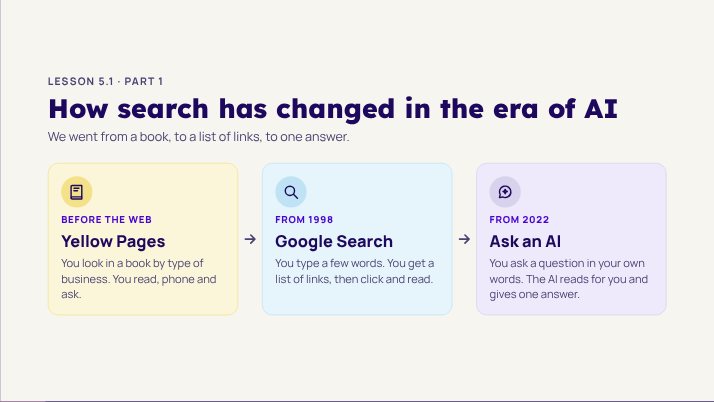
Lesson 5.1 · Part 1
How search has changed in the era of AI
We went from a book, to a list of links, to one answer.
BEFORE THE WEB
Yellow Pages
You look in a book by type of business. You read, phone and ask.
FROM 1998
Google Search
You type a few words. You get a list of links, then click and read.
FROM 2022
Ask an AI
You ask a question in your own words. The AI reads for you and gives one answer.

Spotlight Talk by Rokas
SEO, GEO and how AI finds things

Lesson 5.1 · Part 2
AI + humans
How jobs change when people and AI work together
How we got here
The evolution of man
Apes
Early humans
Hunters
Office workers
Developers
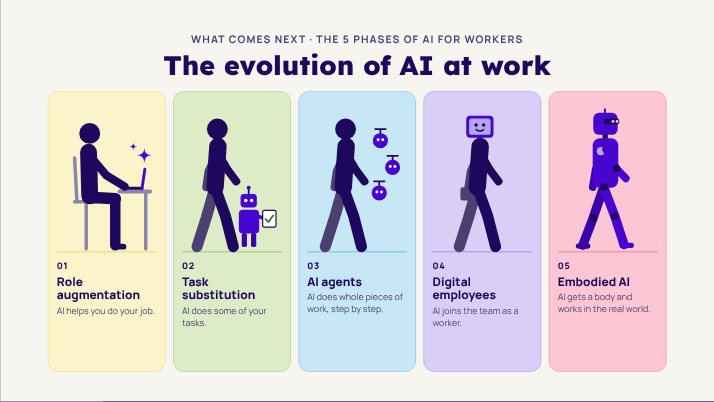
What comes next · The 5 phases of AI for workers
The evolution of AI at work
01
Role augmentation
AI helps you do your job.
02
Task substitution
AI does some of your tasks.
03
AI agents
AI does whole pieces of work, step by step.
04
Digital employees
AI joins the team as a worker.
05
Embodied AI
AI gets a body and works in the real world.
Phase 1 of 5 · Role augmentation
Supporting your skills
AI helps with some tasks inside the job you already have.
AI helps you decide, look at data and do routine tasks.
You stay in control. AI makes you faster.
Example: customer service staff use AI to find answers fast.
Here is a reply:


Phase 2 of 5 · Task substitution
Replacing a whole task
AI takes over repeated, rule-based tasks, so you can do harder work.
Routine tasks are handed over to AI.
People focus on new ideas, plans and solving problems.
Example: AI does data entry or answers simple customer questions.
Phase 3 of 5 · AI agents
Replacing a whole workflow
AI agents finish work on their own, with little or no checking by people.
Agents run a process from start to end, within set limits.
People step in less for routine work.
Example: an AI assistant books meetings and sends simple messages by itself.
Phase 4 of 5 · Digital employees
Replacing an employee
AI takes on set roles that people used to do.
A digital employee has a role in the team, like a virtual colleague.
People and digital employees do tasks together.
Example: an AI assistant gives customer support day and night.
Our team
# general
# support
# sales
Jonas 09:12
A client asks about a refund. Can someone answer?
Ava APP 09:12
Done. I sent the client our refund steps and added a note in the CRM. ✅
Phase 5 of 5 · Embodied AI
Giving AI a body
AI moves into robots that act in the physical world on their own.
AI comes into the workplace as robots or smart devices.
It can do tasks that need moving or handling things.
Example: robots in factories, hospitals and warehouses.

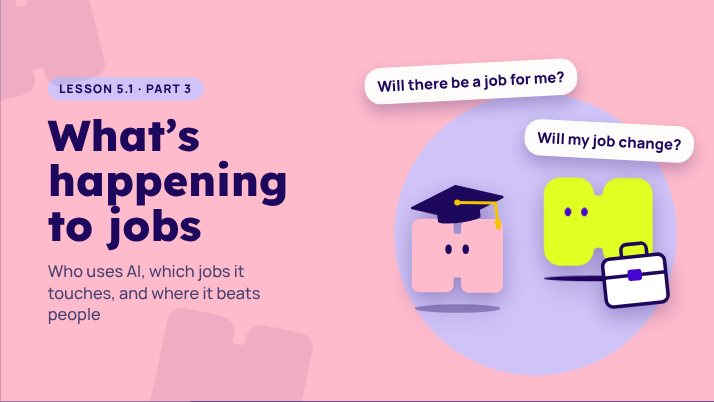
Lesson 5.1 · Part 3
What’s happening to jobs
Who uses AI, which jobs it touches, and where it beats people
AI usage
Where people use AI the most
How much each country uses Claude, compared with its number of people. 1× is what you would expect.
1× expected
Australia
Singapore
Switzerland
Luxembourg
New Zealand
Canada
Norway
Iceland
Malta
France
Source: Anthropic Economic Index, Claude.ai conversations, updated 26 June 2026. anthropic.com/economic-index (opens in a new tab)
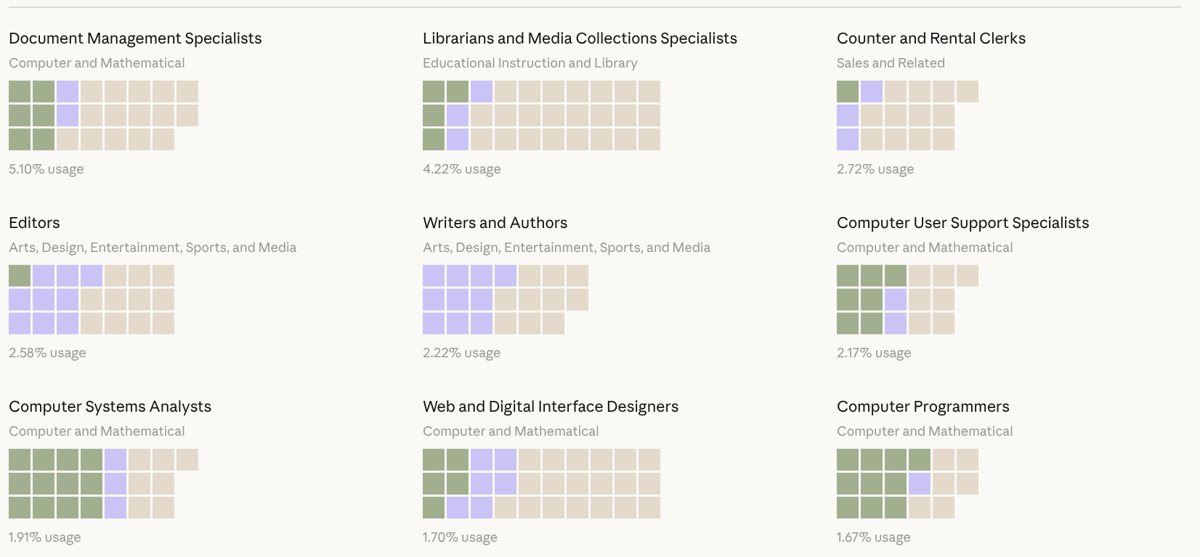
Jobs that use AI the most
AI is already part of these jobs
People hand AI routine parts, like data entry, and work with it on ideas. Share of all Claude.ai conversations.
Document management specialists
Librarians
Counter and rental clerks
Editors
Writers and authors
Computer support specialists
Computer systems analysts
Web and interface designers
Source: Anthropic Economic Index, Claude.ai conversations, updated 26 June 2026. anthropic.com/economic-index (opens in a new tab)
Which roles?
Where AI fits most and least
Microsoft Research (2025) matched 200,000 Copilot chats to the tasks in each job.
Fits most
Interpreters and translators
Writers and authors
Customer service staff
Fits least
Nursing assistants
Roofers
Dishwashers
Humans vs AI
AI outcompeting humans
Each bar runs from the first test to the year AI did as well as people. The bars get shorter.
Handwriting
Speech
Images
Reading
Language
Common sense
School maths
Writing code
Years read from a chart by Will Henshall for TIME, with data from Contextual AI, so they are close, not exact. Tests: MNIST, Switchboard, ImageNet, SQuAD, GLUE, HellaSwag, GSM8K and HumanEval.
The reality
AI as the great leveller
It lifts those who start lower the most…
…but it fails quietly on tasks it cannot do.
758 consultants at Boston Consulting Group worked on real tasks, with and without GPT-4.
+43%
Lower half
Quality of work rose 43% for those who scored lowest on their own.
+17%
Top half
The strongest performers gained much less.
What people really do
Secret cyborgs
Many people already use AI at work and do not tell anyone. They may be unsure of the rules, or afraid of looking lazy.
Be open about how you use it.
Quiet use means no shared learning
It also means no shared rules
Open use lets a team get better together
A job is a bundle of tasks
AI takes tasks, not whole jobs
Look at your own future job as a list of tasks.
01
Tasks AI takes
Drafting, summarising, sorting, searching and first checks.
02
Tasks that grow
Judgement, talking to people, deciding, and caring.
03
New tasks
Checking AI work, setting it up, and teaching others.


Lesson 5.2
Driving AI adoption in teams
How to get a whole team using AI, and keep it going
Wednesday 18 November · after the break
Driving AI adoption
Six barriers to adoption
Teams stall on people, data and rules, not on the technology. Clear each one.
01
Internal data
The information the AI needs is scattered, private or out of date.
02
Adoption
People do not trust it, do not have time to learn it, or fear for their job.
03
Customisation
A general tool does not know your company, your words or your rules.
04
Privacy and security
People paste private data into tools the company has not checked.
05
Accountability
When AI gets it wrong, nobody knows who is responsible.
06
Unclear value
Nobody measures what it saves, so the project loses support.
Barrier 1 · Internal data
Connect AI to your work tools
A connector lets your AI read the tools you already use.
Ask about your own work: “What did the team decide on Tuesday?”
The AI looks in Slack, Drive or Linear and answers.
It only sees what you are allowed to see.
Your AI Linear
 GitHub
 Slack
 Drive
 Gmail
 CalendarHumble
 HubSpot
Barrier 2 · Adoption
Why people do not use AI
Buying the tool is easy. Getting people to use it is the hard part.
Skills
They do not know where to start, or how to ask well.
Digital confidence
Some people are less at home with new tools.
Time
Learning feels like extra work on top of the day job.
Incentives
Nothing rewards them for trying. The old way still counts.
Fear
They worry AI will replace them, or make them look lazy.
Trust and rules
One wrong answer, or unclear rules, and they stop.
Barrier 3 · Customisation
Teach AI how your company works
Give it your data, know-how, processes, examples and rules.
Save them as a skill or project instructions.
Answers then fit your company, not the internet.
Used in every chat by the whole team
More than a style guide
Show it, don’t just tell it
Barrier 4 · Privacy and security
Protecting your A$$ Data & IP
Agree which AI tools the company has checked.
Sort data into three groups everyone can remember.
More on this later, in Privacy and trust.
Barrier 5 · Accountability
A person owns every AI answer
Name one owner for each AI task.
Check before you send or decide.
Keep a record of what the AI did.
It’s the only step that matters
Barrier 6 · Unclear value
Measure what it saves or gains
Pick one number before you start, such as time per task.
Measure it before and after.
Share the result with the team.
Lesson 5.2 · Part 1
AI is different in a team
One person and a chat window is easy. A team is harder.
Multiplayer mode
What changes when it is not just you
On your own
You choose the tool
Your notes are your own
You decide what is good enough
Mistakes cost you
In a team
Everyone needs the same tools and rules
Information has to be shared safely
Someone sets the standard
Mistakes reach customers
One slide, four words
Privacy, security, governance, precision
Ask all four before you roll anything out.
01
Privacy
Whose information is it, and is the AI allowed to see it?
02
Security
Who can get in, and where does the data go?
03
Governance
Who decides the rules, and who checks they are followed?
04
Precision
How often is it right? How do we know?
A simple test
Where does your data go?
Before you paste anything into an AI tool, know where it goes. This matters most for work and client information.
Use tools your organisation has approved
Check the data and training settings
Keep names, secrets and client data out of prompts
Lesson 5.2 · Part 2
Buy or build
Four ways to get an AI system, with trade-offs.
Choose with care
Four options
Option
What it is
Good for
Watch out for
AI-first software
A new product built around AI.
Fast results
Newer, can change fast
Old software plus AI
A tool you use already adds AI features.
Low effort to start
Features may be basic
A platform
A service you configure and build on.
Flexible
Needs skill and time
Build in-house
Your team builds it itself.
Fits you exactly
Costly to build and keep
Discuss · 10 minutes
Buy or build your project?
Does a tool like this already exist?
What would make ours different?
Do we have the skill and time to build it?
What if the supplier changes the price or closes?
The 5 phases, in a team
Every phase needs an owner
In 5.1 you placed your own role on the 5 phases. On your own, you are the owner. In a team, say who owns what.
Who sets the instructions or skills?
Who checks the output?
Who is told when it goes wrong?
A career thought
Your project is your portfolio
People get hired by showing what they built, not only what they studied.
A live prototype beats a list of skills
Write down what you decided, and why
Keep it in a place you can share
Lesson 5.2 · Part 3
The future of work
Bigger questions, with no easy answers.
Follow the money
Incentives and ethics
Companies that make AI also need to make money. That shapes what they build and how it behaves.
Ask who pays for the tool
Ask what they gain from your use
Ask what happens to your data
Discuss · 10 minutes
What data is valuable?
What do you know that nobody else has written down?
Whose data would a company pay for?
Who should own the data you create?
What would you never want sold?
A real deal · August 2026
Old company data is now worth money
Spirit Airlines went bankrupt. Google paid $10 million for its old business data, to help train AI.
Millions of staff emails and Teams chats, plus pricing data
A rival bidder, Mercor, offered $7.5 million
Personal details are removed before Google gets it
The flight attendants’ union objected
Source: CNN, Forbes and Cybernews, 18 August 2026. The sale needed court approval.
Lesson 5.2 · Part 4
Implications for work
What AI means for finding a job, and for the teams that hire
Recap
Four ways to deal with a problem
Resolve
Do what worked before. It is fast and good enough.
Solve
Find the best answer, with data and tests.
Absolve
Hand the problem to someone else, so it is no longer yours.
Dissolve
Change the way you work, so the problem goes away.
How will you grow?
Four ways to get the work done
Hire people
More of the same team.
Resolve
Automate the role
Build a system that does the work.
Solve
Outsource the work
To people or to AI, outside your team.
Absolve
Hire an AI worker
A new kind of team member.
Dissolve
Before you choose
What happens to your current team?
Your current team
What does it mean to hire an AI worker?
Planning your AI workforce
Hire an AI worker
Hands-on · 5 minutes
Save your takeaways
Use your AI tool and the Humble connector to keep what you learned today.
Save a note in Humble called “Lesson 5: AI at work and in teams”, with my three biggest takeaways from today: [type them here]. File it in a folder called “ISM Essentials of AI”, and make the folder if it does not exist yet.
Lesson 5: AI at work and in teams
New note · ISM Essentials of AI
Wrap-up
What we covered today
Jobs change
Tasks change, not whole jobs.
Humans and AI
Use both well.
The future
Questions we will keep asking.
Teams
Agreements, owners and barriers.
Trust
Privacy, security, governance, precision.
Buy or build
Four options.
Up next
Lesson 6: Spotting AI opportunities
Start with the business problem, then use the evaluation framework, your options and the five interfaces of AI.
Friday 20 November, 08:40 and 10:20
You need the class password.
Arrange slides
Drag a slide to move it, use its arrows, or remove it with the bin. Removed slides can be restored below. Saved in this browser only.